
Sync rules
Use this page before the first live sync and any time the Preview counts look surprising.
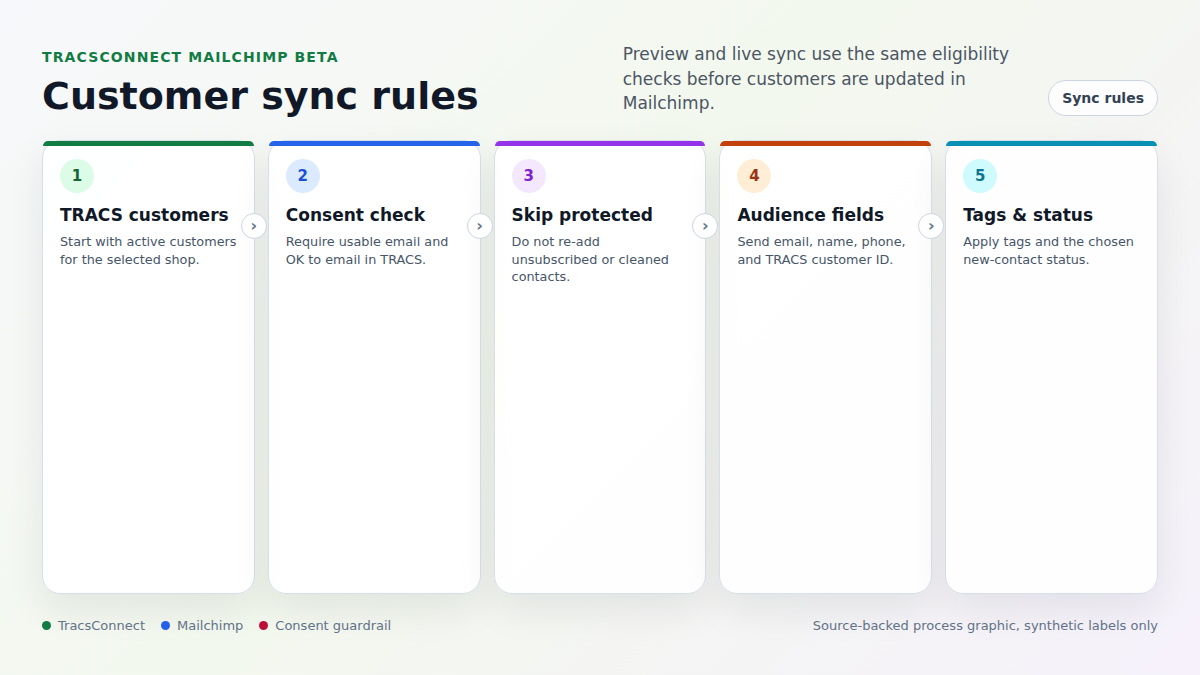
Customers TracsConnect can sync
Section titled “Customers TracsConnect can sync”TracsConnect can sync a TRACS customer when all of these are true:
- The customer belongs to the selected shop.
- The customer is active.
- The customer has a usable email address.
- The customer is marked OK to email in TRACS.
- Mailchimp has not already marked the contact unsubscribed or cleaned.
Customer details sent to Mailchimp
Section titled “Customer details sent to Mailchimp”TracsConnect sends:
- Email address
- First name
- Last name
- Phone
- TRACS customer ID
- The TRACS Customer tag
- Any extra tags saved in the Mailchimp setup window
Customers TracsConnect skips
Section titled “Customers TracsConnect skips”TracsConnect skips customers when:
- The email address is missing or unusable
- The customer is inactive in TRACS
- The customer is not marked OK to email in TRACS
- Mailchimp already marked the contact unsubscribed
- Mailchimp already marked the contact cleaned
- The customer has not changed since the last successful sync
Preview counts
Section titled “Preview counts”The Preview panel shows the same count groups used by the live run:
- Selected: customers reviewed by the sync
- Eligible: customers that passed the rules
- Skipped: customers held back by consent, status, missing email, or no-change rules
- Upserted: customers updated immediately
- Queued: customers queued for a larger Mailchimp batch
- Failed: customers that could not be updated
If Skipped or Failed is higher than expected, review Troubleshoot Mailchimp before running a live sync.
Mailchimp status updates
Section titled “Mailchimp status updates”When Mailchimp sends TracsConnect an unsubscribe, cleaned, subscribe, or email-change update, TracsConnect records that status for future sync decisions.
The important rule is simple: TracsConnect does not force a contact back into marketing email after Mailchimp marks that contact unsubscribed or cleaned.