
RCS setup (optional)
RCS (Rich Communication Services) is a newer way of sending text messages. When it works, your customer sees your shop’s name and logo at the top of the conversation instead of just a phone number. When their phone or carrier doesn’t support RCS, Voxtelesys automatically falls back to plain SMS — so you don’t have to think about who gets which.
RCS is optional. Plain SMS works fine without it. Turn it on only if you want the upgraded look.
Before you start
Section titled “Before you start”You should have:
- Voxtelesys already connected to TracsConnect (see Connect to TracsConnect)
- A clear brand name for your shop — what you want customers to see at the top of the message
- Time to open a support ticket with Voxtelesys and wait for approval
Step 1: Open a support ticket with Voxtelesys
Section titled “Step 1: Open a support ticket with Voxtelesys”In the Voxtelesys Portal, open a support ticket asking to be registered as a verified RCS sender. Tell them your shop’s brand name and the number you’ll be sending from (the same one you put in TracsConnect).
Voxtelesys will reply with next steps — usually a short approval process where they confirm your business is real and not going to spam people. This typically takes a few business days.
Step 2: Wait for approval
Section titled “Step 2: Wait for approval”Voxtelesys will email you when approval is complete. Don’t enable RCS in TracsConnect until you’ve received this confirmation — if you turn it on early, messages will still send as plain SMS (the fallback kicks in), but you won’t see the brand name your customers expect.
Step 3: Turn on RCS in TracsConnect
Section titled “Step 3: Turn on RCS in TracsConnect”Once approved:
-
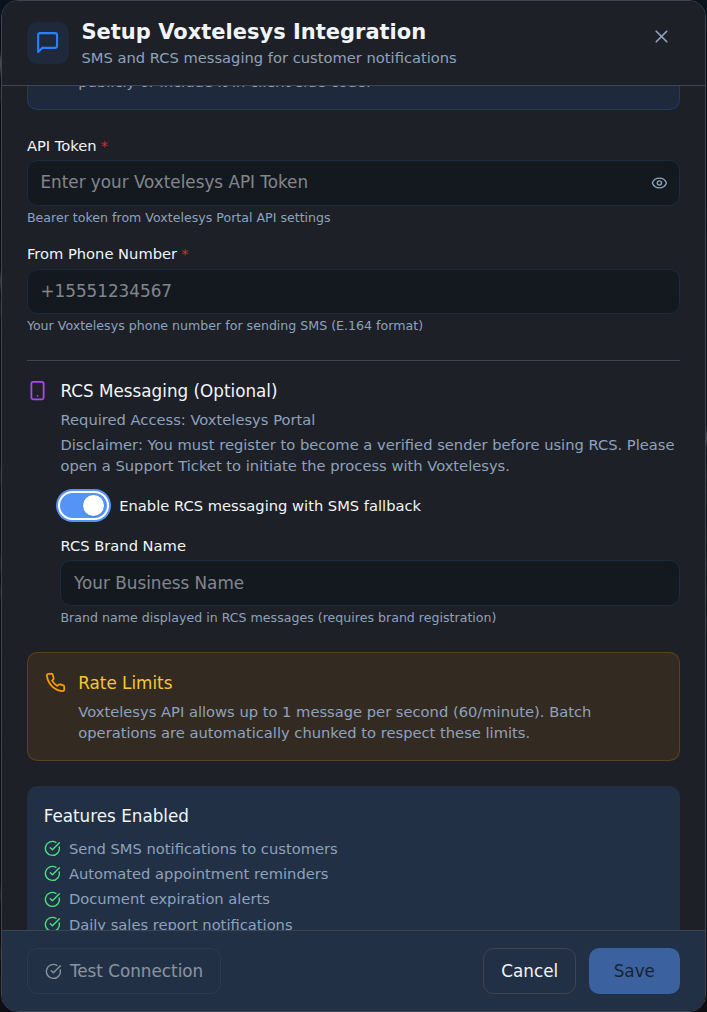
Open Integrations in your dashboard, find the Voxtelesys card, and click Edit.
-
Flip the Enable RCS messaging with SMS fallback switch to on.
-
Type your RCS Brand Name — this is the name that will appear at the top of the message thread on your customer’s phone. Use your shop’s display name as your customers know it (e.g.
Smith's Auto Repair, not your legal LLC name). -
Click Save.
How fallback works
Section titled “How fallback works”When RCS is on:
- Customers on RCS-capable phones with RCS-capable carriers see your brand name, logo (if Voxtelesys has it on file), and richer formatting.
- Customers whose phone or carrier doesn’t support RCS get a plain SMS instead — same words, same From number, just without the branding.
- The dashboard records the delivery either way. You don’t have to track who got which.
You can turn RCS off again at any time by flipping the switch back. Future messages will go out as plain SMS.
What happens if you skip this whole step
Section titled “What happens if you skip this whole step”Plain SMS works fine. Customers see your shop’s phone number instead of your brand name. Reminders, alerts, and dashboard-triggered texts all still go out. The only thing missing is the upgraded look on RCS-capable phones.
For most shops, plain SMS is a perfectly reasonable starting point. Add RCS later if and when you want the polish.